 GitLanes
The graph, the merge, the commit. Nothing else.
GitLanes is a small, fast, free git GUI for macOS, Windows and Linux. It does the parts of git that are better with a picture and leaves the rest to your terminal.
Built on GPUI, the GPU-accelerated UI framework behind the Zed editor. Designed to be fast.
Free. No account, no sign-in, no trial.
Checking for the latest version…
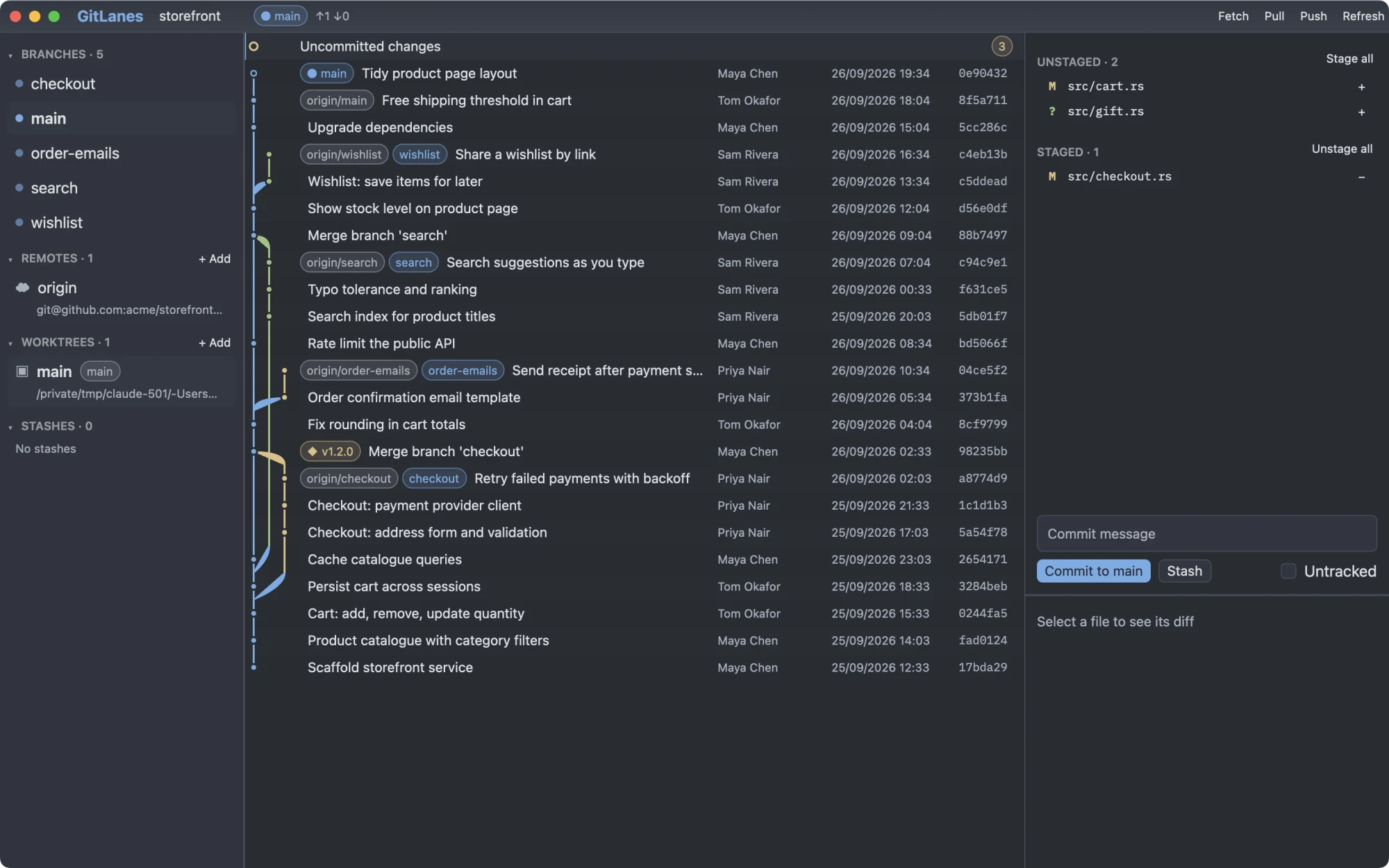
Everything you open a git GUI for
And none of the dashboards, boards, sign-in screens, or subscriptions that came with the last one.
Commit graph
Every branch in its own coloured lane, so you can see what diverged, what merged, and where you are.
Act from the graph
Merge, cherry-pick, and check out straight from a commit or branch. Create, push, and delete tags the same way.
Staging and commit
Review diffs, stage what you mean to, and commit. Stash the rest and bring it back later.
Remotes and worktrees
Add and edit remotes, and manage worktrees, without looking up the flags again.
It runs your git
Every write shells out to the git binary. Hooks, commit signing, credential helpers, and merge drivers behave exactly as they do on the command line.
Built on GPUI, like Zed
Written in Rust on GPUI, the same UI framework that powers the Zed editor. Every frame is drawn on the GPU and the app is designed to be fast. No browser inside.
Install
The buttons always get the latest release. After that, GitLanes updates itself.
macOS (Apple Silicon)
- Open the download and drag GitLanes to Applications.
- Open GitLanes. macOS says it can't verify the app: click Done.
- In System Settings → Privacy & Security, click Open Anyway. Only needed once.
Or skip steps 2 and 3 in a terminal:
xattr -dr com.apple.quarantine /Applications/GitLanes.appWindows (x64)
- Run the installer. It installs for your user and adds GitLanes to the Start menu. No admin rights needed.
- If Windows says it protected your PC, click More info, then Run anyway. Only needed once.
- You need Windows 10 or 11 and Git for Windows.
Linux (x86_64)
- Run this in a terminal. It installs for your user in
~/.localand adds GitLanes to your app menu. No root needed. - You need git and a Vulkan-capable GPU driver.
curl -fsSL https://gitlanes.com/install.sh | shOther ways to install on Linux
Debian, Ubuntu: the .deb package.
sudo apt install ./gitlanes-*-linux-x86_64.debFedora: the .rpm package.
sudo dnf install ./gitlanes-*-linux-x86_64.rpmPackages live in /usr, so their updates ask for your password. There's also a plain binary.